提示词配置(Prompt Config)
Langfuse 中的提示词 config 是一个附加到每个提示词的可选任意 JSON 对象,可供执行 LLM 调用的代码使用。常见用例包括:
- 存储模型参数(
model、temperature、max_tokens) - 存储结构化输出 schema(
response_format) - 存储函数/工具定义(
tools、tool_choice)
由于 config 与提示词一起版本化,你可以在一个地方管理所有参数。这使得切换模型、更新 schema 或调整行为变得容易,而无需触碰应用代码。
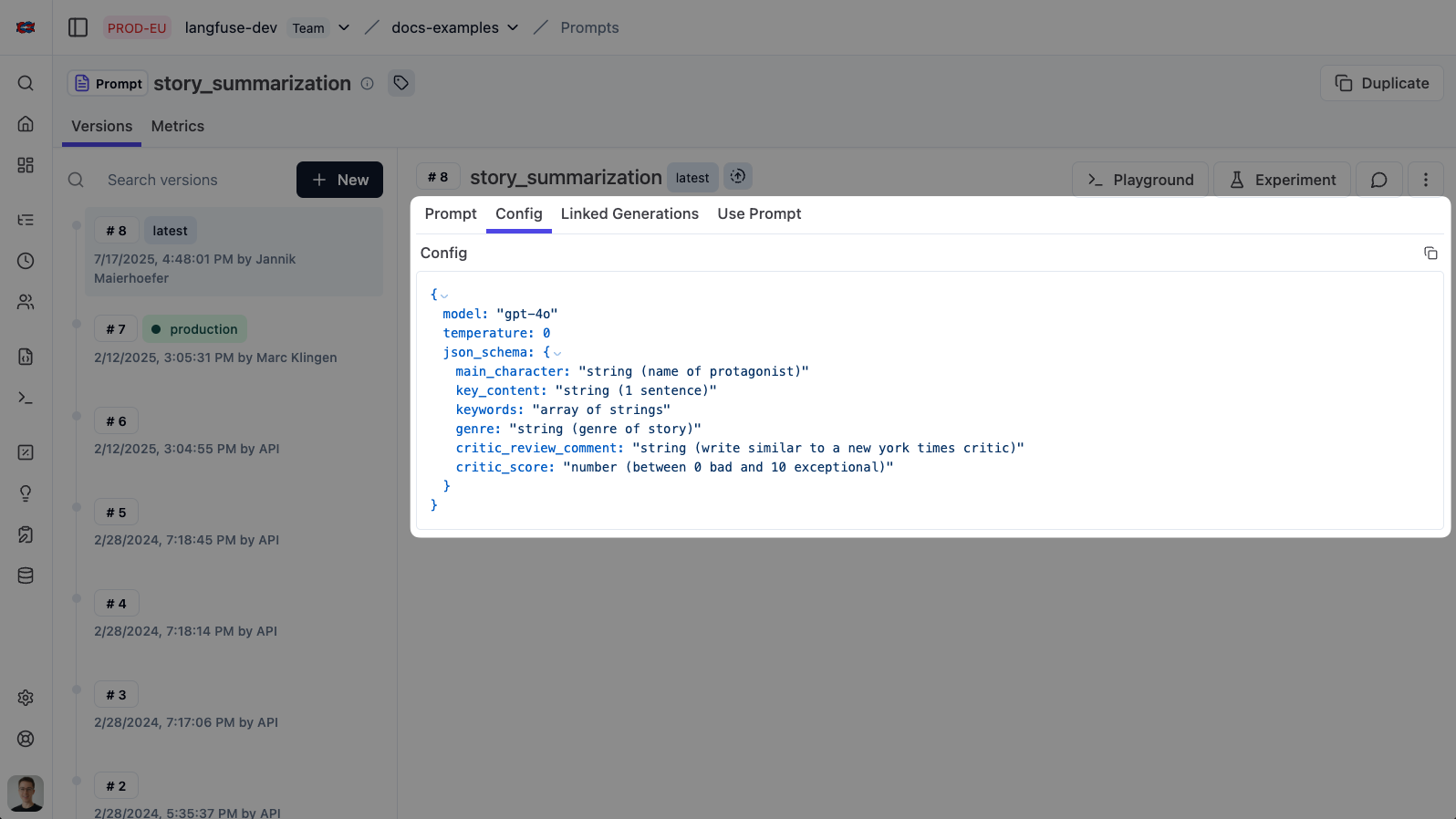
设置 config
设置 config 既可以通过 Langfuse 提示词 UI 完成,也可以通过 SDK 完成。
UI
要为你的提示词添加或编辑 config:
- 在 Langfuse UI 中导航到 Prompt Management
- 选择或创建一个提示词
- 在提示词编辑器中,找到 Config 字段(JSON 编辑器)
- 以有效的 JSON 对象形式输入你的 config
- 保存提示词——config 现在与此提示词版本一起版本化
Python SDK
在创建或更新提示词时传递 config 参数:
from langfuse import get_client

langfuse = get_client()

# example config with a model and temperature
config = {
    "model": "gpt-4o",
    "temperature": 0
}

langfuse.create_prompt(
  name="invoice-extractor",
  type="chat",
  prompt=[
    {
      "role": "system",
      "content": "Extract structured data from invoices."
      }
  ],
  config=config
)
JS/TS SDK
在创建或更新提示词时传递 config 参数:
import { LangfuseClient } from "@langfuse/client";

const langfuse = new LangfuseClient();

// example config with a model and temperature
const config = {
  model: "gpt-4o",
  temperature: 0
}

await langfuse.prompt.create({
  name: "invoice-extractor",
  type: "chat",
  prompt: [
    { role: "system", content: "Extract structured data from invoices." }
  ],
  config: config
});
你可以直接在 Playground 中用其 config 测试你的提示词。
使用 config
下面的示例从提示词 config 中检索 AI 模型和 temperature。
获取提示词后,通过 config 属性访问 config,并将值传递给你的 LLM 调用。
Python SDK
本示例使用 Langfuse OpenAI 集成进行追踪,但这是可选的。 你可以使用任何方法调用你的 LLM(例如直接使用 OpenAI SDK、其他提供商等)。
from langfuse import get_client

# Initialize Langfuse OpenAI client for this example.
from langfuse.openai import OpenAI
client = OpenAI()

langfuse = get_client()

# Fetch prompt
prompt = langfuse.get_prompt("invoice-extractor")

# Access config values
cfg = prompt.config
model = cfg.get("model")
temperature = cfg.get("temperature")

# Use in your LLM call
client.chat.completions.create(
  model=model,
  temperature=temperature,
  messages=prompt.prompt
)
JS/TS SDK
本示例使用 Langfuse OpenAI 集成进行追踪,但这是可选的。 你可以使用任何方法调用你的 LLM(例如直接使用 OpenAI SDK、其他提供商等),并仍然使用 config。
import { LangfuseClient } from "@langfuse/client";

// Initialize OpenAI client for this example.
import OpenAI from "openai";
import { observeOpenAI } from "@langfuse/openai";
const client = observeOpenAI(new OpenAI());

const langfuse = new LangfuseClient();

// Fetch prompt
const prompt = await langfuse.prompt.get("invoice-extractor");

// Access config values
const cfg = prompt.config;
const model = cfg.model;
const temperature = cfg.temperature;

// Use in your LLM call
client.chat.completions.create({
  model,
  temperature,
  messages: prompt.prompt
});
示例用例
结构化输出
当你需要 LLM 以特定 JSON 格式返回数据时,将 schema 存储在你的提示词 config 中。这让 schema 与提示词一起版本化,让你无需更改代码即可更新它。
最佳实践: 使用带 type: "json_schema" 和 strict: true 的 response_format 来强制 schema。这确保模型的输出与你的预期结构完全匹配。如果你使用 Pydantic 模型,用 type_to_response_format_param 转换它们——参见 OpenAI 结构化输出指南。
from langfuse import get_client
from langfuse.openai import OpenAI

langfuse = get_client()
client = OpenAI()

# Fetch prompt with config containing response_format
prompt = langfuse.get_prompt("invoice-extractor")
system_message = prompt.compile()

# Extract parameters from config
cfg = prompt.config

# Example config:
# {
#   "response_format": {
#     "type": "json_schema",
#     "json_schema": {
#       "name": "invoice_schema",
#       "schema": {
#         "type": "object",
#         "properties": {
#           "invoice_number": { "type": "string" },
#           "total": { "type": "number" }
#         },
#         "required": ["invoice_number", "total"],
#         "additionalProperties": false
#       },
#       "strict": true
#     }
#   }
# }

response_format = cfg.get("response_format")

res = client.chat.completions.create(
  model="gpt-4o",
  messages=[
    {"role": "system", "content": system_message},
    {"role": "user", "content": "Extract invoice number and total from: ..."},
  ],
  response_format=response_format,
  langfuse_prompt=prompt,  # Links this generation to the prompt version in Langfuse
)

# Response is guaranteed to match your schema
content = res.choices[0].message.content
函数调用
对于 agent 和使用工具的应用,将你的函数定义存储在提示词 config 中。这让你能够将可用工具与提示词一起版本化和更新。
最佳实践: 在 config 中存储 tools(带 JSON Schema 参数的函数定义)和 tool_choice。这让你的函数签名保持版本化,让你无需部署代码变更即可添加、修改或移除工具。
from langfuse import get_client
from langfuse.openai import OpenAI

langfuse = get_client()
client = OpenAI()

# Fetch prompt with config containing tools
prompt = langfuse.get_prompt("weather-agent")
system_message = prompt.compile()

# Extract parameters from config
cfg = prompt.config

# Example config:
# {
#   "tools": [
#     {
#       "type": "function",
#       "function": {
#         "name": "get_current_weather",
#         "description": "Get the current weather in a given location",
#         "parameters": {
#           "type": "object",
#           "properties": {
#             "location": { "type": "string", "description": "City and country" },
#             "unit": { "type": "string", "enum": ["celsius", "fahrenheit"] }
#           },
#           "required": ["location"],
#           "additionalProperties": false
#         }
#       }
#     }
#   ],
#   "tool_choice": { "type": "auto" }
# }

tools = cfg.get("tools", [])
tool_choice = cfg.get("tool_choice")

res = client.chat.completions.create(
  model="gpt-4o",
  messages=[
    {"role": "system", "content": system_message},
    {"role": "user", "content": "What's the weather in Berlin?"},
  ],
  tools=tools,
  tool_choice=tool_choice,
  langfuse_prompt=prompt,  # Links this generation to the prompt version in Langfuse
)
完整的端到端示例参见 OpenAI Functions cookbook 和 Structured Outputs cookbook。