文档 / 用户追踪(User Tracking)
用户追踪(User Tracking)
用户视图(Users view)提供所有用户的总览,也让你深入了解单个用户。将 Langfuse 中的数据映射到单个用户非常简单。只需在 observations 之间传播 userId 属性即可。它可以是用户名、邮箱或任何其他唯一标识符。userId 是可选的,但使用它能让你从 Langfuse 获得更多价值,例如按 userId 聚合 LLM 使用成本等指标。参见集成文档了解更多。
使用 @observe() 装饰器时:
python
from langfuse import observe, propagate_attributes

@observe()
def process_user_request(user_query):
    # Propagate user_id to all child observations
    with propagate_attributes(user_id="user_12345"):
        # All nested observations automatically inherit user_id
        result = process_query(user_query)
        return result
直接创建 observations 时:
python
from langfuse import get_client, propagate_attributes

langfuse = get_client()

with langfuse.start_as_current_observation(
    as_type="span",
    name="process-user-request"
) as root_span:
    # Propagate user_id to all child observations
    with propagate_attributes(user_id="user_12345"):
        # All observations created here automatically have user_id
        with root_span.start_as_current_observation(
            as_type="generation",
            name="generate-response",
            model="gpt-4o"
        ) as gen:
            # This observation automatically has user_id
            pass
使用上下文管理器时:
ts
import { startActiveObservation, propagateAttributes } from "@langfuse/tracing";

await startActiveObservation("context-manager", async (span) => {
  span.update({
    input: { query: "What is the capital of France?" },
  });

  // Propagate userId to all child observations
  await propagateAttributes(
    {
      userId: "user-123",
    },
    async () => {
      // All observations created here automatically have userId
      // ... your logic ...
    }
  );
});
使用 observe 包装器时:
ts
import { observe, propagateAttributes } from "@langfuse/tracing";

// An existing function
const processUserRequest = observe(
  async (userQuery: string) => {
    // Propagate userId to all child observations
    return await propagateAttributes({ userId: "user-123" }, async () => {
      // All nested observations automatically inherit userId
      const result = await processQuery(userQuery);
      return result;
    });
  },
  { name: "process-user-request" }
);

const result = await processUserRequest("some query");
更多细节参见 JS/TS SDK 文档。
python
from langfuse import get_client, propagate_attributes
from langfuse.openai import openai

langfuse = get_client()

with langfuse.start_as_current_observation(as_type="span", name="openai-call"):
    # Propagate user_id to all observations including OpenAI generation
    with propagate_attributes(user_id="user_12345"):
        completion = openai.chat.completions.create(
            name="test-chat",
            model="gpt-3.5-turbo",
            messages=[
                {"role": "system", "content": "You are a calculator."},
                {"role": "user", "content": "1 + 1 = "}
            ],
            temperature=0,
        )
将 propagateAttributes() 与 CallbackHandler 一起使用:
python
from langfuse import get_client, propagate_attributes
from langfuse.langchain import CallbackHandler

langfuse = get_client()
handler = CallbackHandler()

with langfuse.start_as_current_observation(as_type="span", name="langchain-call"):
    # Propagate user_id to all observations
    with propagate_attributes(user_id="user_12345"):
        # Pass handler to the chain invocation
        chain.invoke(
            {"animal": "dog"},
            config={"callbacks": [handler]},
        )
将 propagateAttributes() 与 CallbackHandler 一起使用:
ts
import { startActiveObservation, propagateAttributes } from "@langfuse/tracing";
import { CallbackHandler } from "@langfuse/langchain";

const langfuseHandler = new CallbackHandler();

await startActiveObservation("langchain-call", async () => {
  // Propagate userId to all observations
  await propagateAttributes(
    {
      userId: "user-123",
    },
    async () => {
      // Pass handler to the chain invocation
      await chain.invoke(
        { input: "<user_input>" },
        { callbacks: [langfuseHandler] }
      );
    }
  );
});
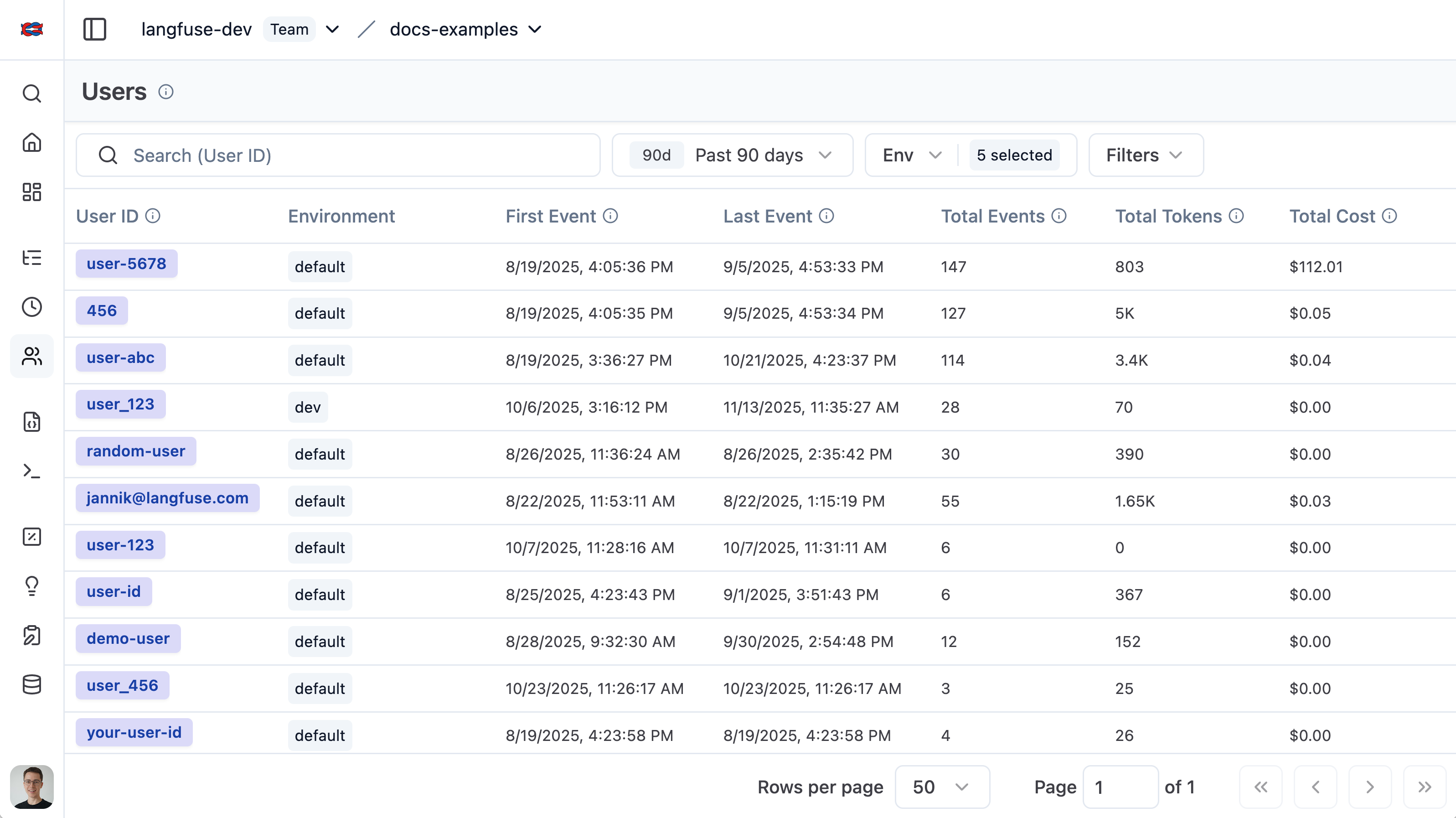
查看所有用户
用户列表提供所有被 Langfuse 追踪的用户的总览。它可以轻松地按总 token 用量、trace 数量和用户反馈进行细分。
单个用户视图
单个用户视图让你深入了解某一个用户。探索聚合指标,或查看该用户的所有 traces 和反馈。
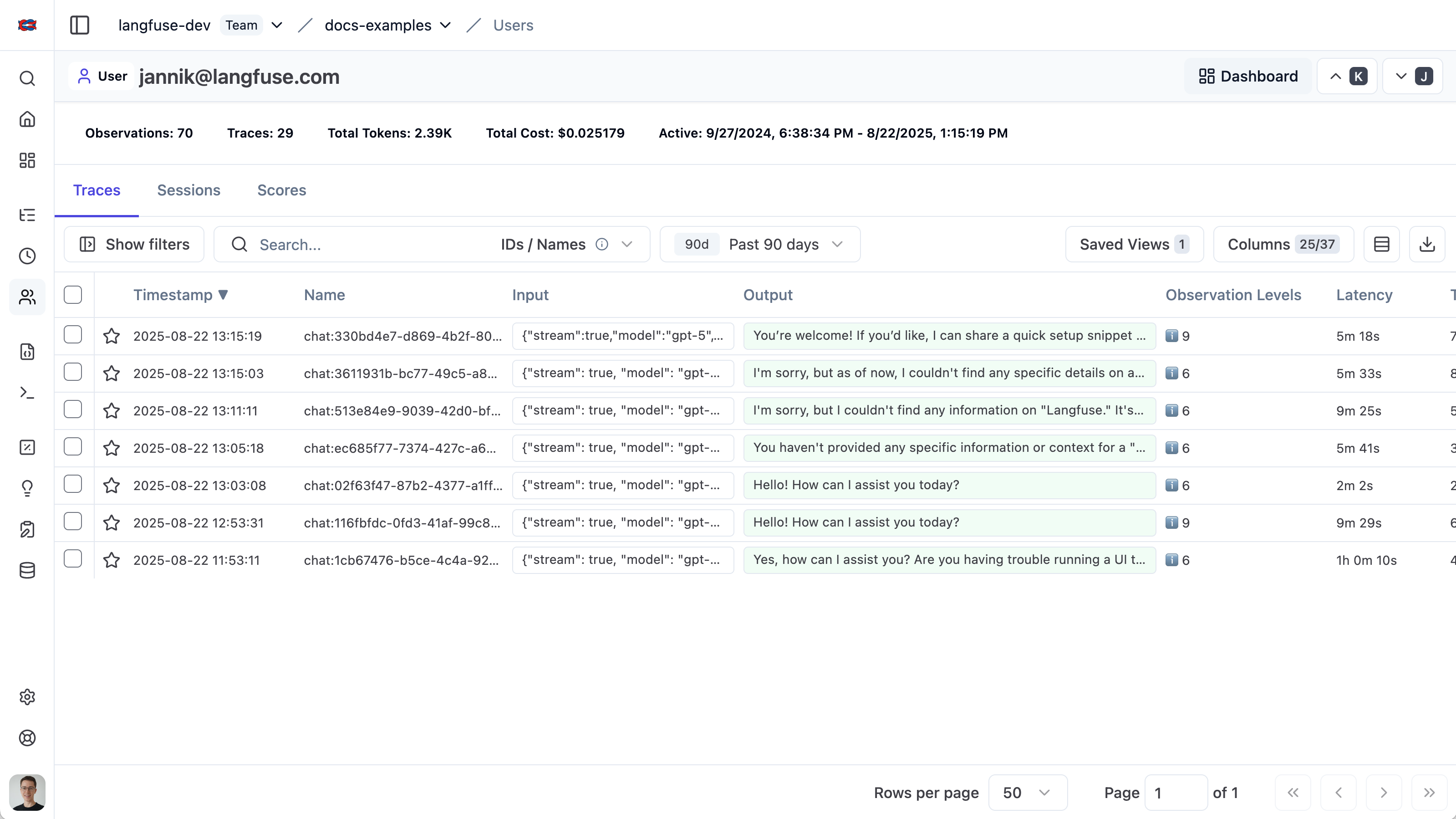
你可以通过以下 URL 格式深度链接到此视图:https:///project//users/
相关资源
- 构建自定义仪表盘,可视化用户级指标,如成本、token 用量和 trace 数量。
- 要以编程方式查询按用户聚合的指标(如成本、token 用量和 trace 数量),请使用 Metrics API。